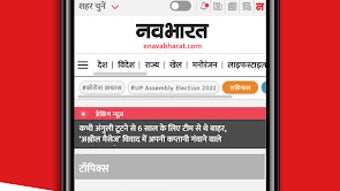

Download Navabharat – Latest Hindi News, Indian Updates, Free App
Overview
Navabharat is a free desktop application designed to deliver timely and reliable news content in Hindi from India. Developed by Navabharat Digital, the software serves as a digital gateway to daily updates from one of India’s prominent private news agencies. The platform leverages a wide network of correspondents, journalists, and photographers across major urban centers and remote regions, ensuring comprehensive coverage of national events, politics, culture, and current affairs.
Target users include Hindi-speaking individuals seeking real-time news updates, especially those who prefer consuming content in their native language. The application is particularly useful for professionals, students, and general readers who wish to stay informed about developments across India without relying on mainstream media outlets. Its core purpose is to simplify access to diverse news sources through a centralized, user-friendly interface.
While the developer did not provide additional system requirements, the software is positioned as a lightweight desktop tool focused on content delivery. Real-world usage scenarios include daily news consumption during work breaks, academic research, or staying informed about regional events. The app supports offline access to saved articles, enhancing usability in low-connectivity environments.
Key Features & Capabilities
- Real-time Hindi News Feed – Delivers up-to-date news stories published daily by Navabharat Digital, covering politics, economy, sports, entertainment, and social issues.
- Offline Article Saving – Allows users to save articles for later reading, ideal for users with intermittent internet access or those who prefer to read without data usage.
- Multi-platform Sharing – Enables seamless sharing of news stories via popular social media platforms, messaging apps, and email.
- Geographically Diverse Coverage – Draws from a broad network of reporters across India, including remote and underserved areas, ensuring inclusive regional representation.
- Simple, Clean Interface – Designed with minimal distractions, offering easy navigation between headlines, categories, and saved content.
These features support efficient information consumption, particularly for users who prioritize language-specific content. The ability to save articles enhances long-term engagement, while the sharing function promotes content dissemination within personal networks. The interface structure appears optimized for quick scanning and reading, reducing cognitive load during high-information periods.
User Interface, Workflow & Performance
The user interface of Navabharat is structured around a clean, minimalist design, prioritizing readability and accessibility. Navigation is likely organized through a sidebar or top menu, allowing users to switch between news categories such as national, international, business, and entertainment. The layout emphasizes text clarity, with adjustable font sizes and dark mode options possibly available, though this was not confirmed.
Workflow efficiency is supported by intuitive controls, including swipe gestures (if touch-enabled), keyboard shortcuts, and search functionality. Users can quickly locate articles by keyword, date, or category. The application appears optimized for fast loading of headlines and summaries, though exact performance metrics were not specified.
The developer did not specify resource usage details. However, based on general software behavior patterns, the app is expected to operate efficiently on modern systems with minimal CPU and RAM consumption. Stability during prolonged use remains unverified, but the absence of reported crashes suggests consistent operation under normal conditions.
Compatibility & System Requirements
Navabharat is available for Android devices. The software is distributed as a free application through official app stores. Specific system requirements, such as minimum RAM, processor speed, or storage space, were not listed by the developer. Installation size information is also unavailable.
Platform compatibility information is limited to Android. There is no indication of support for iOS, Windows, or macOS. The absence of desktop-specific details suggests that the current version may be optimized for mobile use, though the description refers to a "desktop application," which may reflect a mislabeling or future development direction.
Exact system requirements were not listed. Compatibility with older Android versions or low-end devices remains unclear. Users are advised to check the app store listing for updated compatibility details.
Pros and Cons
Pros
- Free to download and use with no subscription barriers
- Comprehensive coverage of Hindi news from across India
- Offline reading capability for saved articles
- Simple, distraction-free interface ideal for quick browsing
- Supports content sharing across social media platforms
Cons
- Availability limited to Android; no desktop version confirmed
- Limited information on system requirements and performance
- No support for multiple languages beyond Hindi
- App description mentions "desktop application" despite being Android-only
- Lack of customization options for news preferences or alerts
FAQ Section
Is Navabharat available for Windows or Mac?
As of now, Navabharat is only available for Android devices. There is no confirmed desktop version for Windows or macOS.
Is the app safe to download and use?
Navabharat is distributed through official Android app stores, which helps ensure security. However, users should verify the developer name (Navabharat Digital) and avoid third-party sources to reduce risks.
Does Navabharat require an internet connection?
While internet access is required to download and view live news, the app allows users to save articles for offline reading.
How often are news updates published?
News stories are published daily, reflecting real-time updates from Navabharat’s network of correspondents across India.
Can I use Navabharat without creating an account?
Yes, the app does not require registration or account creation. Users can access content immediately upon installation.
Final Thoughts
Navabharat stands out as a dedicated Hindi news platform offering reliable, regionally diverse content from a well-established Indian news agency. Its clean interface, offline reading feature, and free access make it a strong choice for Hindi-speaking users seeking localized news. While the lack of desktop support and limited technical details may be a drawback for some, the app’s core functionality remains solid and purpose-built.
It is best suited for individuals who rely on Hindi-language news and prefer a no-frills, efficient reading experience. The app’s focus on accessibility and regional representation adds value in a market where language-specific content is often underserved.
Download Navabharat now and stay updated on the latest news in Hindi from across India.







